TM SIM registration is a process that aims to comply with the SIM Card Registration Act in the Philippines. This law requires all mobile network subscribers to register their SIM card electronically through the Telco’s website or any registration facility. The law aims to protect consumers against illegal practices and takes effect on December 27, 2022.

To register a TM SIM card, customers can visit the new.globe.com.ph/simreg website or use the GlobeOne app. Foreign nationals will need to submit their passport and other special documents. Once registered, customers can enjoy uninterrupted mobile services and avoid the inconvenience of SIM card deactivation due to non-registration. The registration process is easy and convenient, and customers can do it from the comfort of their homes or any registration facility.
It is essential to register a TM SIM card to comply with the law and avoid any inconvenience. This article will provide a step-by-step guide to make the registration process easy and convenient.
What is TM
TM, also known as Touch Mobile, is a subsidiary of Globe Telecom, one of the leading telecommunications companies in the Philippines. TM offers affordable prepaid and postpaid mobile plans, as well as other value-added services such as mobile internet, international roaming, and mobile banking.
As a telecommunications company, TM is required by law to comply with the SIM Card Registration Act. TM SIM registration is a process whereby users are required to register their prepaid SIM cards with TM to verify their identity and activate their mobile service. This process involves filling out a registration form, providing a valid ID, and taking a selfie.
TM has made the SIM registration process easy and convenient for its customers. Users can register their TM SIM cards online through the TM Tambayan website or the GlobeOne app. They can also register their SIM cards in TM stores and authorized dealers nationwide.
The SIM Registration Process
To comply with the SIM Card Registration Act in the Philippines, TM users are required to register their SIM cards. The SIM registration process is simple and straightforward. Here are the steps to follow:
Steps for Registration
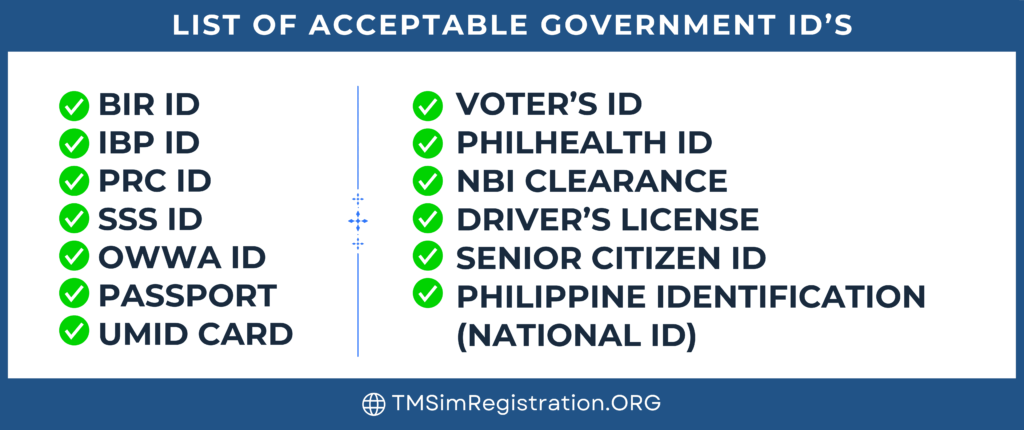
Before starting the registration process, TM users need to make sure they have their SIM card number and one of the following identification documents: Passport, SSS ID, Driver’s License, IBP ID, OWWA ID, NBI Clearance, or PRC ID.
Required Documents
TM users need to provide a valid identification document to complete the registration process. The identification document should be valid and must match the information provided during registration.
Online Registration Guidelines
TM users can complete the registration process online by visiting the official TM SIM registration website at https://new.globe.com.ph/simreg. The user needs to fill out the registration form and upload a scanned copy of their identification document. Once the registration form is submitted, the user will receive a text confirmation.
Verification and Activation
After submitting the registration form, TM users need to wait for the verification and activation of their SIM card. The verification process may take up to 24 hours. Once the verification is complete, the user will receive a text message confirming the activation of their SIM card.
Overall, the SIM registration process is simple and easy to complete. TM users need to make sure they have their identification document and SIM card number ready before starting the registration process. By following the online registration guidelines, users can complete the registration process quickly and easily.
Frequently Asked Questions
How do I register my TM SIM card online?
To register your TM SIM card online, simply visit the official TM SIM registration website at new.globe.com.ph/simreg. Follow the steps provided on the website to complete the registration process.
What steps should I follow to activate my TM SIM via SMS?
To activate your TM SIM via SMS, send the keyword REG to 8080. You will receive a confirmation message once your SIM is activated.
Where can I find the official TM and Globe SIM registration link?
The official TM and Globe SIM registration link can be found on the new.globe.com.ph/simreg website. Make sure to use the official link to avoid scams.
What should I do if my TM SIM card registration fails?
If your TM SIM card registration fails, make sure to double-check the information you provided. If the problem persists, contact TM customer service for assistance.
How can I verify if my Globe SIM is already registered?
To verify if your Globe SIM is already registered, simply call the Globe customer service hotline at 211 using your Globe mobile number. A customer service representative will assist you with your inquiry.
Is there a deadline for registering my Globe SIM card?
Yes, there is a deadline for registering your Globe SIM card. All SIM users in the Philippines, both existing and new, must register their SIM cards with local telecommunication companies Globe, Smart Communications, and DITO Telecommunity Corp. The SIM Card Registration Law took effect on December 27, 2022. Make sure to register your SIM card before the deadline to avoid service interruption.

 TM Sim Registration